
AI CAN Bus Data Analysis [Claude Code + CANedge]

Can an AI agent make you a 10x CAN engineer?
Here, Martin Falch shows how to analyze CAN bus data with AI agents like Claude Code, our CANedge CAN bus data loggers and our open source CANedge AI skills.
This is now how our team at CSS works with CAN data every day.
You'll be able to just ask questions - for example:
- "Optimize my CANedge file size"
- "Create a DBC file from this PDF"
- "Which vehicle in my fleet is having issues - and why?"
- "Give me an overview of my fleet's driving patterns from my S3 data lake"
It takes 5 min to set up and changes everything - as proven in 10 practical showcases.
Learn more below - we guarantee you won't regret it.
In this article
- The CAN data bottleneck
- CANedge + AI agent skills
- Why use the CANedge
- How the skills work
- How to get started
-
10 x showcases
- 1: 70 GB of raw data in minutes
- 2: Cut log file size by 90%
- 3: Fix DBC files that fail to decode
- 4: Why won't the vehicle drive?
- 5: Spot devices not uploading
- 6: Compare fleet energy use
- 7: Grafana dashboards + alerts
- 8: Let the team 'talk to the data'
- 9: AI battery fingerprint
- 10: Create custom tools
- Key takeaways
The challenge: CAN data analysis is hard
Logging CAN data is easy. Extracting insights from the data is much harder - every step takes time and expertise:
- Configuring devices incl. e.g. filters requires expertise
- Creating/editing DBC files is slow and error-prone
- GUI tools are OK for 1 log file - but not for 1000
- Effectively processing large volumes of data is non-trivial
- Fleet-level analysis requires custom scripts
The result is a bottleneck: Analyses take days instead of minutes - and often depend on a few (swamped) super users.

The solution: CANedge + AI agent skills

Obviously, AI can help - but not all AI is equal.
AI chatbots in your browser like ChatGPT/Claude help a bit.
AI agents like Claude Code go further: They run on your PC, use your files and write/run code. They might make you 2x faster.
However, AI agents + 'skills' can make you 10x faster!
To show this, I'm sharing my personal CANedge AI skills suite - from configuration and DBC files to raw data overviews, data analysis, data lake queries and Grafana dashboards.
As you'll see, it's almost like real-life cheat codes ...
Why the CANedge is ideal for AI agents
The skills in this article are built around the CANedge - and there are a few good reasons for that:

No software lock-in
We don't sell software licenses or subscriptions. We just want you to get to insights efficiently - that way we sell more devices

Open standards
MF4, JSON Schema, Parquet, S3, SQL, CLI tools and Python: The CANedge uses open formats perfect for AI agents

Docs for AI
Our CANedge Intro and Docs come in LLM-friendly plain text - giving your agent the optimal knowledge foundation

AI-ready data lakes
With our Parquet data lake workflows, your data is already set up for AI agents - with SQL as a clean, simple interface
No. The AI agent workflow is not an 'either/or' - it supplements and utilizes existing software:
- CANcloud: This is great for ad hoc access to my S3 buckets for managing devices, when no 'advanced stuff' is required
- Config Editor: For quick/simple config changes I still use the editor - but for time-consuming complex edits I now use AI agents
- DBC editor: Use the online DBC editor for quick single-file edits; use AI agents for building new DBCs from scratch
- asammdf: Go-to tool for interactive offline analysis of a single log file - but I use AI for multi-file analysis or insight extraction
- Grafana: Use for dashboards that you wish to monitor repeatedly and share with others - use agents to build the dashboards
How does it work?
Below I outline what the skill suite does under the hood - and the key insights that went into it.
1: A suite of agent skills (one per tool)
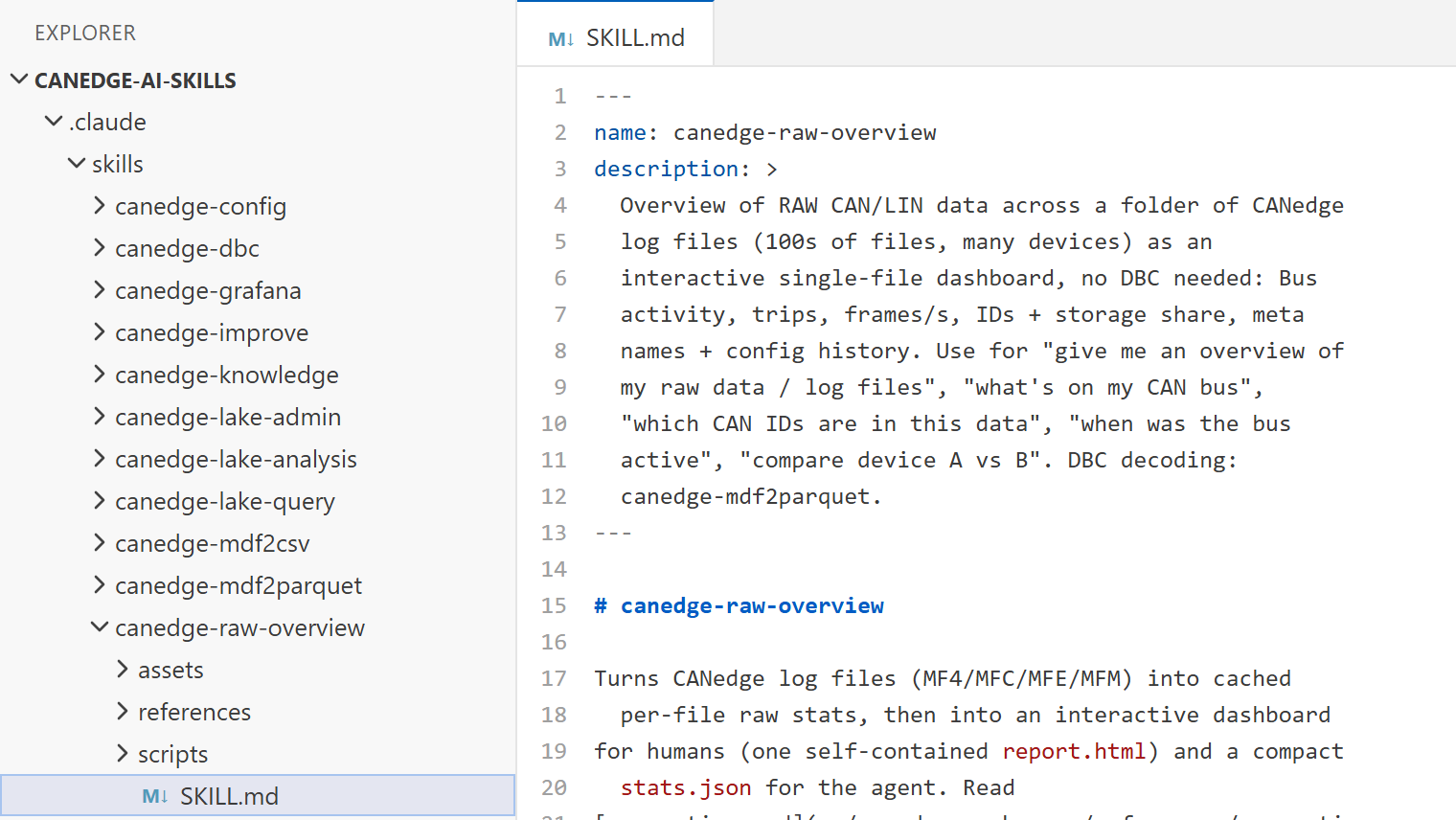
Each skill is a folder with instructions, context and scripts. The suite has 15+ skills in three layers: Foundation (our CANedge Docs for AI, so the agent knows the CANedge instead of guessing), tool skills (e.g. MF4 decoders, DBC files, S3, Grafana) and analysis + reporting. You can use the full suite - or pick and choose.
2: Tools + scripts for consistent results
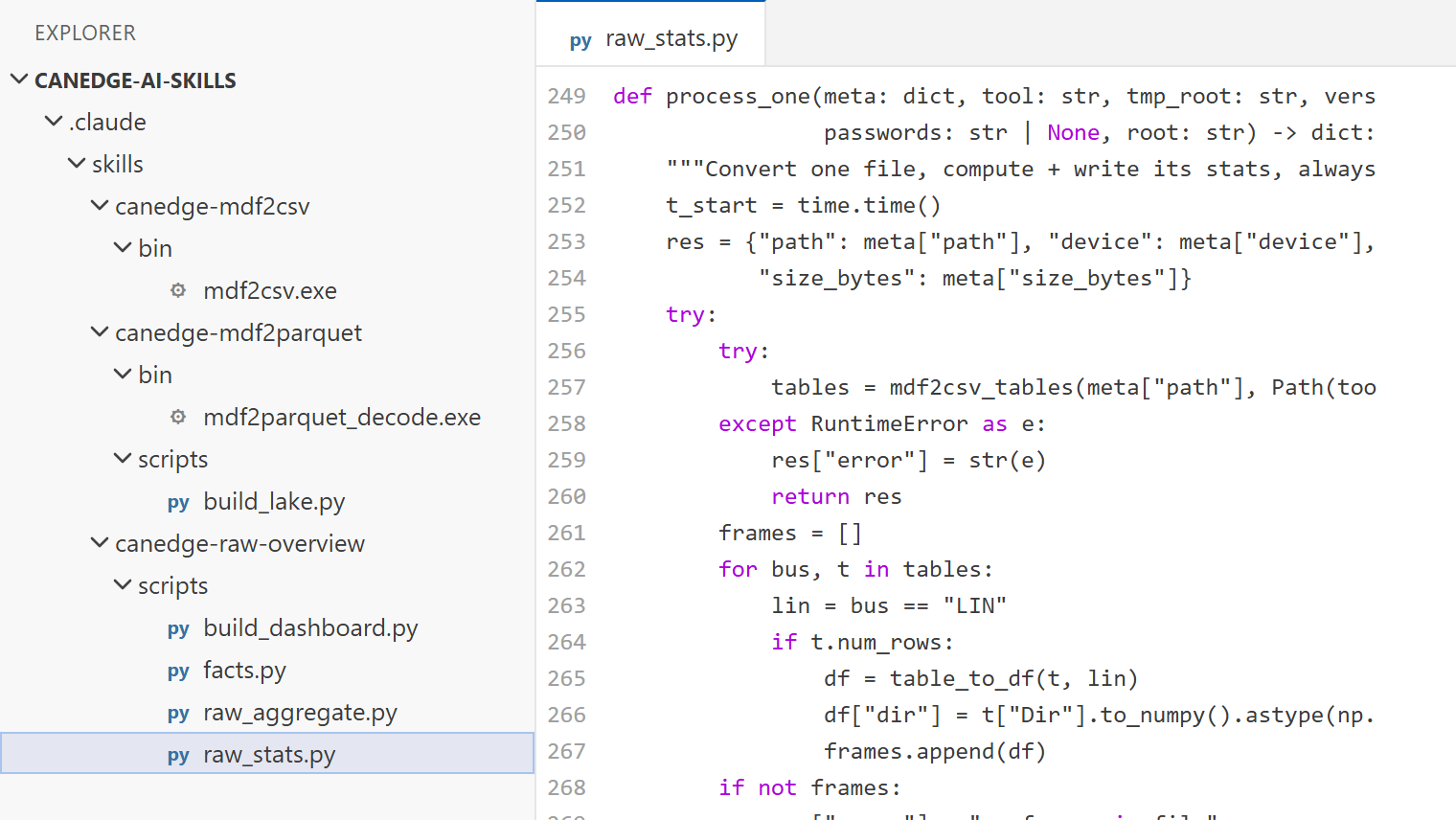
Our MF4 converters and decoders (e.g. MF4 to CSV or Parquet) and bundled Python scripts (e.g. raw data stats, DBC checks) do the heavy lifting. The agent focuses on the reasoning - which is faster, cheaper and more consistent than new code every time.
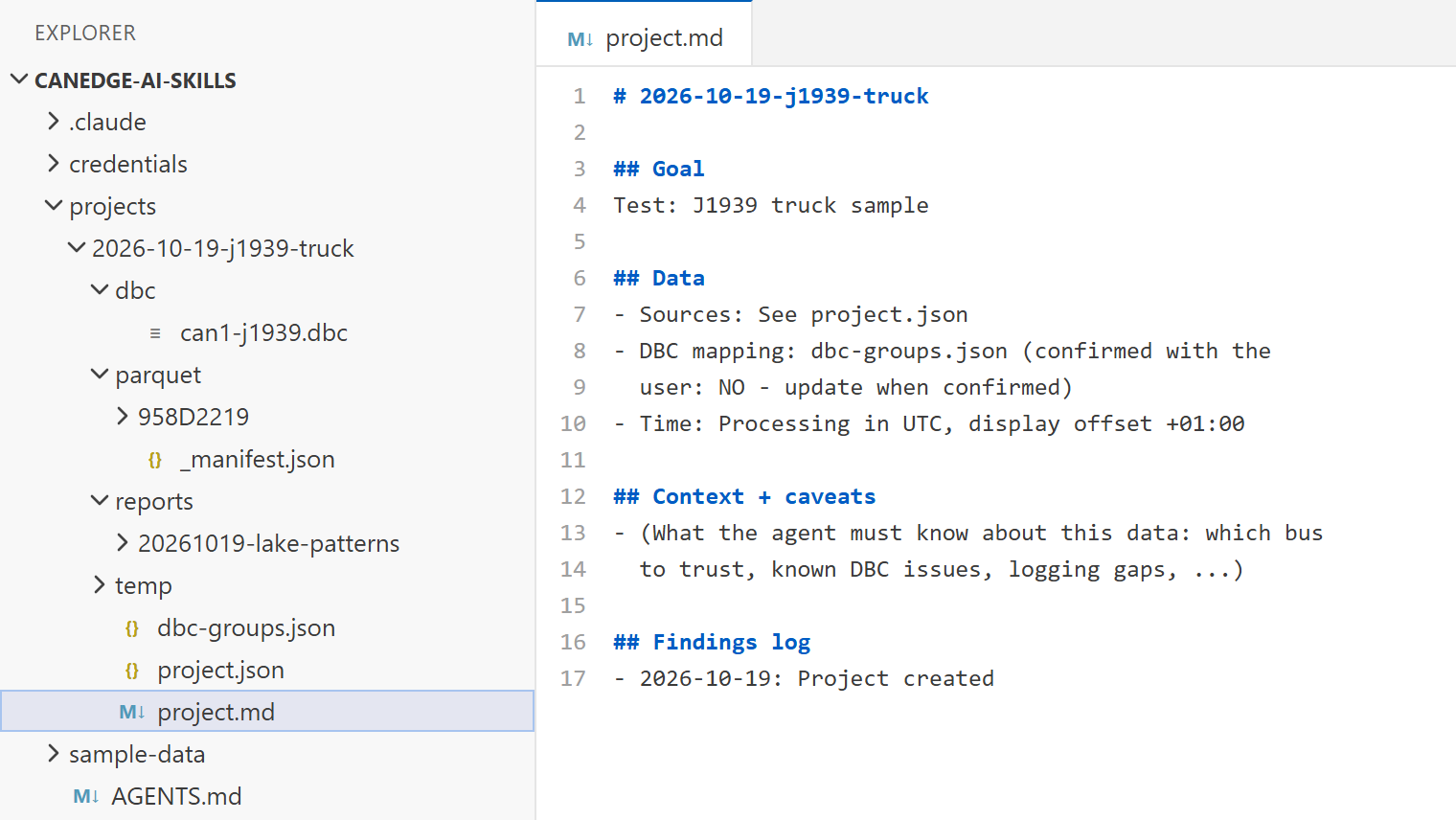
3: Project folders + data safety
Your raw log files are not moved, modified or deleted - the agent references them where they are. Processed data (e.g. Parquet) lives in project folders and can be re-created, so you can add new log files later and re-run the analysis.
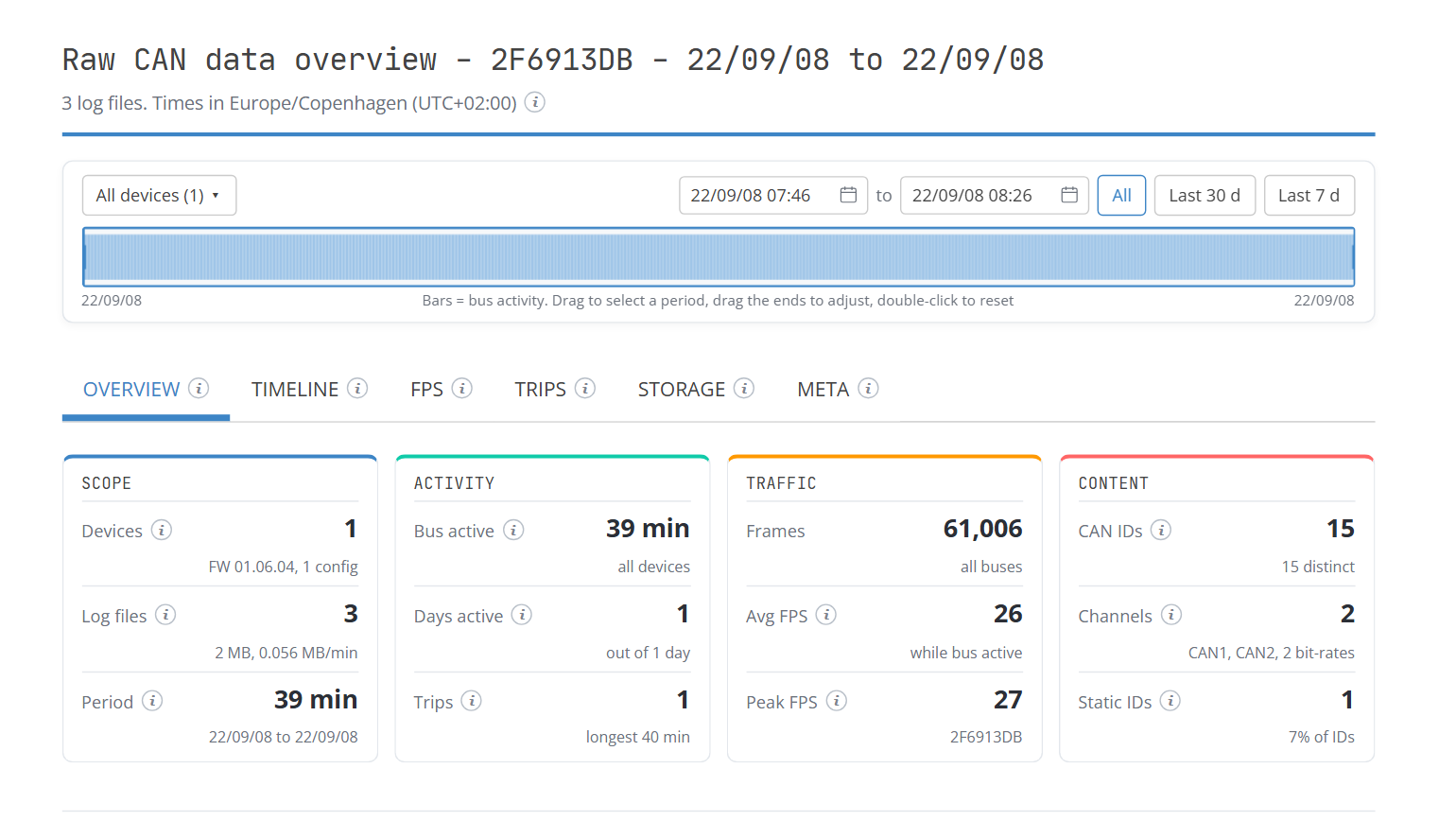
4: Output - consistent reports
The skills output JSON content (for agents) and shareable HTML reports (for humans). This adds a consistent 'framing' of the results - while still allowing the agents to e.g. create custom scripts to achieve the requested analysis (see e.g. showcase 9).
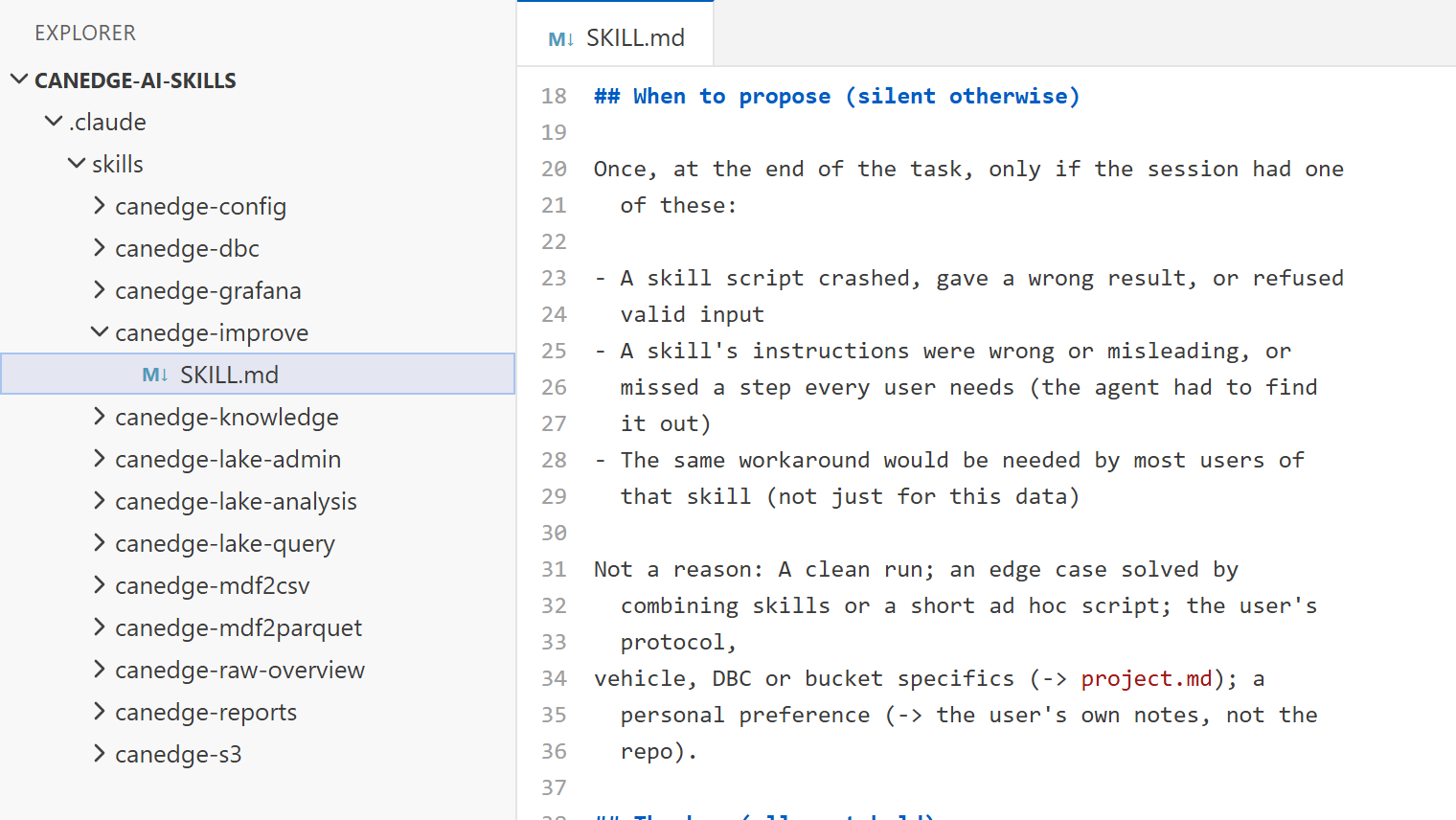
5: Skills that improve themselves
If a session hits a real problem with a skill (e.g. a bug), the agent proposes a general fix and helps you optionally turn it into a pull request on GitHub. Sensitive info like your data/DBC files stay local. This way, every CANedge user helps improve the suite.
For small, decoded datasets, ChatGPT data analysis works well (see my ChatGPT + CAN article). For real CAN data it falls short:
- Data volume: A single CANedge can record GBs of raw data per week. Uploading this to a chatbot is slow (or impossible) - and the agent should only see summaries and results, not millions of frames
- Tools: A chatbot runs code in a cloud sandbox. It can't use our MF4 tools, your Python setup or your S3 credentials. An agent on your PC can - and our skills tell it exactly how to use them
- Local + cloud access: An agent on your PC works directly with your SD card data, our MF4 tools and your S3 data lake. No need for slow, manual uploads or downloads of GBs of raw log files
An MCP server gives an AI agent access to a tool or API. Skills add the workflow around it: Which tool to use when, which checks to run and how to present the result - plus scripts that run locally on your data.
For CANedge data, the tools are already CLI tools, Python and SQL, which AI agents use natively. Skills are therefore the simpler fit. However, you can of course modify the skill suite as you see fit if you e.g. prefer to use MCP servers.
You can ask the agent to 'connect my S3 bucket' (or data lake). It opens a small setup window where you paste and test your keys, so they never end up in the chat. Which keys you use decides what the agent can do:
- Full data lake: The programmatic access keys from your data lake stack (S3 buckets, Athena and the automation logs)
- Only S3: The device keys of your S3 input bucket, e.g. to explore log files without a data lake
- Read-only S3: An extra IAM user with the read-only S3 policy from the CANedge Intro - the agent can explore, but not modify
- Query-only: The Athena keys you also use for Grafana - no S3 access at all, ideal for your colleagues
If a task needs more rights than your keys allow, the script stops and says which keys it needs. BigQuery and MinIO work too.
- Keys stay local: They are stored in a local profile file (excluded from git) and never shown in the chat, reports or logs
- Least privilege: Use read-only or query-only keys - and one IAM user per colleague, so you can revoke access individually
- Log files are not changed: The S3 skills are read-only. Only the data lake skill writes - and only its control files
- Data stays in your cloud: Queries run in your own Athena, BigQuery or Azure Synapse, and only the results come back to your PC
- You stay in control: Claude Code asks before running commands - and the skills ask before cloud jobs that add significant cost
- Open source: All skills and scripts are on GitHub, so your IT team can review exactly what runs
With that said, use at your own risk. AI agents can make mistakes, so review what the agent proposes before you run or deploy it. If you want to start more conservatively, you can consider working with the offline skills to start with.
How to get started
To follow the workflows in this article you need:
- A CANedge1, CANedge2 or CANedge3 - and some log files
- Optionally: An S3 bucket and/or a Parquet data lake
Next, follow the README in our canedge-ai-skills GitHub repo (5 min).
Tip: The repo includes sample data, so you can try the skills right away - simply write:
Set up the CANedge skill suite and check my setup
If you're used to ChatGPT, a tool like Claude Code may seem daunting at first.
However, if you follow the README you'll find that it's quite simple: You install a couple of things - and then you are back to your normal prompting, just directly on your PC via Visual Studio Code. And now your AI agent can access your log files, our MF4 tools, Python - and your S3 data.
The skill suite is built around Claude Code, which is what I use daily. However, the skills use the open Agent Skills format: Markdown instructions and Python scripts, plus an 'AGENTS.md' file with the project rules.
To use e.g. Codex, open the repo folder in it and ask it to adapt the repo to its own skill format. The outputs are plain HTML and JSON files either way.
10 x showcases: AI CAN data analysis in practice
Let's make it concrete: I'll pretend I'm an engineer at an electric vehicle OEM - and the go-to CANedge user on my team.
I have 3 vehicles with CANedge1 units, 70 GB of raw CAN data, a list of issues from the field - and no time!
Below I'll go through my journey from a first look at the raw data - to democratizing cloud data insights across my team.
Yes: The showcases mirror the exact situation of one of our long-term CANedge end users (anonymized). His team shared a subset of their data and DBC files for this article - and gave feedback on the skill suite. The showcases are based on real scenarios that this engineer encountered while using the CANedge.
Part 1: Offline AI analysis of your SD card data
1: Get overview of 70 GB of raw data
My first task: Figure out what is actually on the bus. 3 vehicles, 1000+ log files and 70 GB of data is far too much for a GUI tool.
So I dump my log files in a folder and ask the agent:
Give me an overview of the raw CAN data in ev-fleet-data/
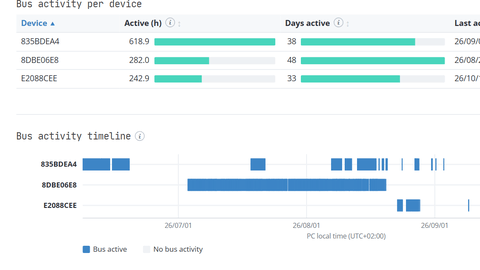
The agent processes every log file and builds an interactive report with bus activity, trips, frame rates and a CAN ID overview. You can explore the actual report below (or download it).
Two things stand out: 50%+ of the CAN IDs are 'static', i.e. the data rarely changes - and across the 127-day period, the CAN bus is only active on ~50 days.
The skill uses our MF4 converters to turn each log file into raw CAN frames - no DBC files needed. It processes files in parallel and only keeps compact statistics, so GBs of raw CSV never pile up on your drive.
The dashboard is backed by a JSON file with the aggregated statistics. Follow-up questions like 'which CAN IDs exist on device A but not B?' are answered from this file, without re-processing the log files.


2: Cut the log file size by 90%
With so many static CAN IDs logged at full rate, my SD cards fill up with data I don't need. So I ask the agent to optimize my config, based on the raw data and my DBC files:
Optimize my Configuration File to reduce the file size - and only log while the vehicle is driving
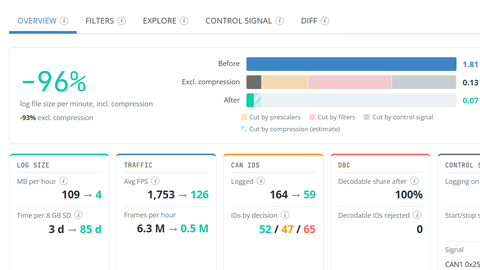
The agent enables compression, drops CAN IDs not matched by my DBC files and adds 'data' prescalers to static messages. It also adds a control signal to only log data while driving.
In total this reduces the log file size by 90%!
I now simply copy the new config to my SD cards for future trips.
The skill simulates the new configuration frame by frame on your own log file - using the same logic as our Config Editor filter builder. This shows the exact effect before you deploy, incl. which signals you would lose. The agent then validates the Configuration File against the official JSON Rule Schema file matching your device type and firmware using a Python-based JSON Schema validator.
Control signals usually build on a DBC signal, e.g. vehicle speed. Without a DBC file, the agent can search the raw data for a bit that shows when the vehicle is active - and set up the control signal from that.
In our test it found such a bit, which the DBC file later confirmed as the low voltage power state.
If you want to go beyond the 90% file size reduction, you can also use the dynamic report to test the consequence of using e.g. 'time' prescalers to reduce the frequency of certain signals via the 'explore' tab of the report. This gives you a live perspective of what the 'prescaled' signal looks like vs. the 'original' signal. If you decide on a suitable prescaler, just ask the agent to add it to the config.
In this showcase, Claude first asks me which DBC files should apply per device - and saves this in a 'dbc-groups.json' for later decoding needs, which is a key part of the skill workflows to avoid Claude simply assuming that all DBC files apply to all devices. If two vehicles use a CAN ID differently, the wrong DBC gives plausible - but incorrect - values.
The 'dbc-groups.json' is also used in our cloud automation, making it easy to work with local vs. cloud data.
3: Review + fix the DBC files
Next, I want to decode the data. But my first attempt stops right away: The decoder refuses to load my DBC files.
Check my DBC files for errors and coverage of my data
The agent checks every DBC file and compares it with the frames actually on the bus. It finds real issues:
- Basic DBC syntax errors
- Duplicate CAN IDs that stop the decoder from loading
- Message lengths that don't match the frames on the bus
- A J1939 flag that merges 3 BMS messages into one
Claude fixes the DBC files and checks that decoding now works.
Syntax checks should be deterministic. The skill therefore uses cantools in strict mode plus our DBC editor checks - and checks the coverage against the actual frames in your log files. The agent adds what such checks cannot: Proposing fixes, logging each change and showing a before/after diff.

Bonus: Create DBC files from PDF or Excel
Don't have a DBC file? The skill can also build one from a PDF or Excel specification - and tell you what it had to fix along the way.
Create a DBC file from this PDF specification
As a test, I let the agent build a DBC from a PDF specification of our CANmod.gps messages. The result was 99.9% identical to our official DBC file - the deviation came from Claude fixing an error in our official DBC ¯\_(ツ)_/¯ ...
4: Find the root cause of a DTC
Now for the real issues. A driver reports that one of the vehicles is having intermittent issues and has observed Diagnostic Trouble Codes (DTCs) on the vehicle display.
A driver is reporting intermittent issues/DTCs in one of our EVs. Decode my data, identify the EV and find the root cause
Note that I don't say where the log files or DBC files are: The agent knows this from the previous showcases (via its project notes and 'dbc-groups.json').
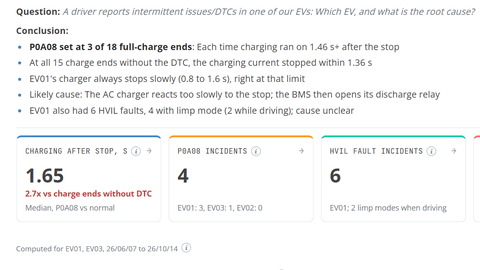
It decodes the 1000+ log files into a local Parquet data lake and screens every fault, DTC and limp mode signal across the 3 vehicles. Without being told which vehicle, it finds that 2 of them logged the P0A08 charger safety DTC - one of them 3 times.
The report also explains why: When the battery management system (BMS) stops a full charge, the charger keeps pushing current for 1.65 s - 2.7x longer than normal. In other words, the charger reacts too slowly. It also flags a second, still unexplained issue on the same vehicle (high voltage interlock faults).
Take a step back and reflect on this:
With zero domain expertise and 1 min of effort I now have a root cause candidate and a ready-to-share report!
The skill uses our MF4 decoders to DBC-decode the log files into Parquet - with the same layout as our cloud data lake. The agent then queries the data with SQL via DuckDB, so even GBs of decoded data are fast to analyze on your PC.
To keep the data lake compact, it only stores the decoded signal values - not the DBC meta information (e.g. message and signal comments, value tables). The agent therefore also reads the DBC files to understand what each signal means, e.g. to find all fault and DTC signals.
A good analysis shows what the reader needs in order to verify the conclusion - not more, not less. The page therefore starts with the answer, followed by the plots that prove it and a few context plots that rule out alternative explanations.

Part 2: AI CAN telematics in the cloud
Fast forward a few months: My vehicles now run CANedge2/CANedge3 units with the optimized configuration. They upload data to my own S3 bucket, and our data lake automation turns it into a Parquet data lake.
In order to tell this story and provide the showcases, I re-use the 70 GB of raw data from above - but I now upload it to S3 and create an Amazon Parquet data lake. I of course used one of the CANedge AI skills (canedge-s3-sd-upload) for this, which helps upload local data to S3 with the correct S3 metadata assigned.
5: Manage the cloud deployment
With 3 vehicles in the field, new questions pop up. Do all devices still log and upload data - and run the latest firmware?
To use my agent, I first need to provide it with S3 access:
I want you to access my Amazon S3 bucket
In response, the agent opens a small GUI where I can provide my credentials (to avoid sharing these in the chat). I can then ask:
Are any of my devices no longer logging or uploading?
The agent builds a dashboard for my S3 input bucket: Log files and GB per day, devices that stopped logging or uploading - and the firmware and configuration status per device.
It also helps me manage the data lake automation itself:
Upload my fixed DBC to the data lake and reprocess
The skills give the agent direct access to your S3 bucket via Python (boto3). You enter your keys once in a setup window, so they never appear in the chat. See also our FAQs on access rights + security.
To stay fast and cheap, the agent reads the metadata the CANedge adds to each uploaded log file (e.g. logging time, firmware) and caches the result. This way it summarizes 1000s of log files without downloading any of them - and asks before large jobs that would add cost.
For the data lake, the agent writes/checks the control files (e.g. the DBC mapping) before uploading them - and reads e.g. the Lambda/Glue processing logs if something fails.


6: Fleet energy use via Athena
Two of my EVs are built on the same platform - so they should use the same energy. Checking this means finding every drive in months of data: About 60 GB of raw log files, far too much to download. So I ask the agent:
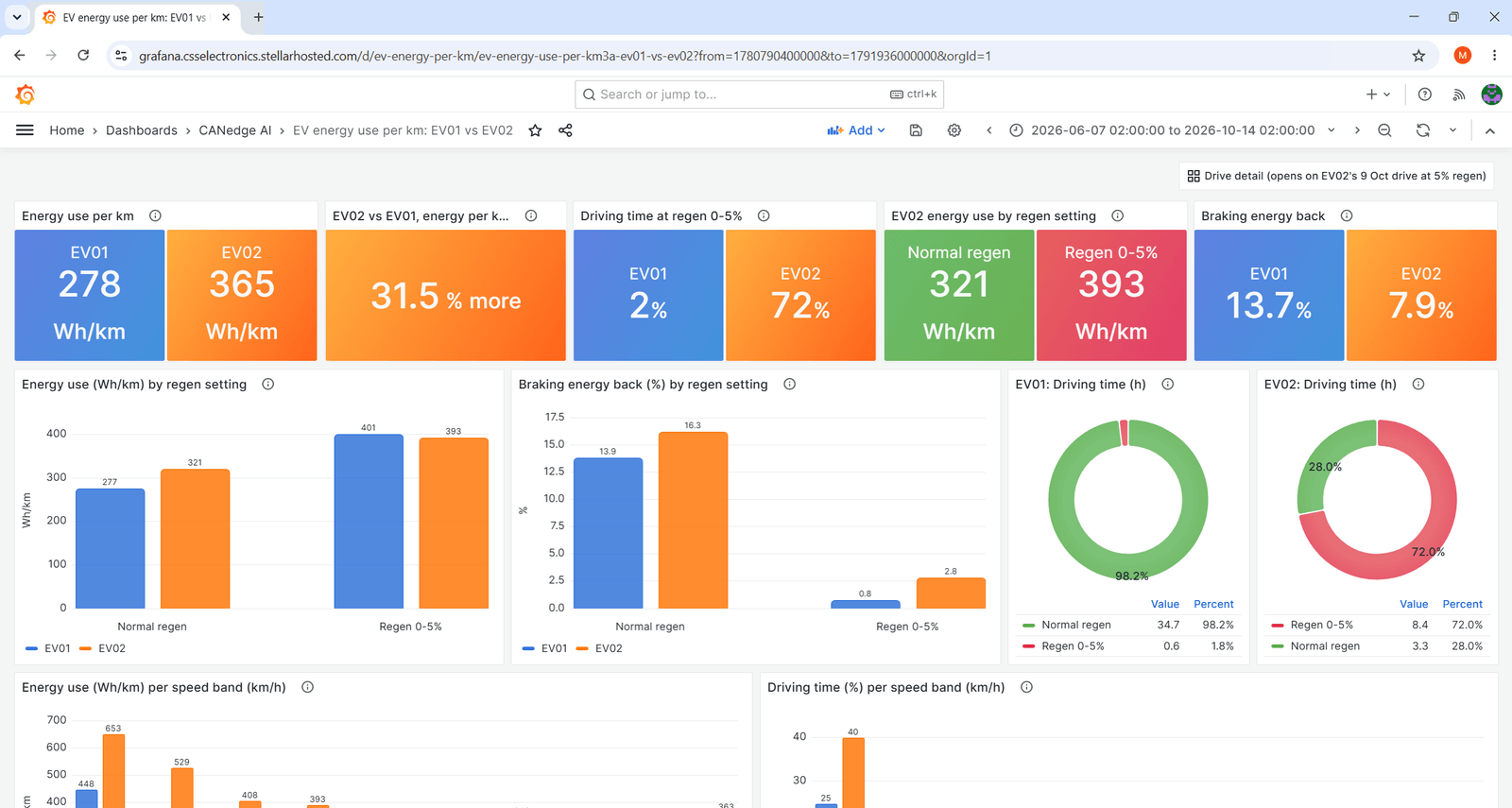
Compare the energy use per km of EV01 and EV02 across all drives - and explain any difference
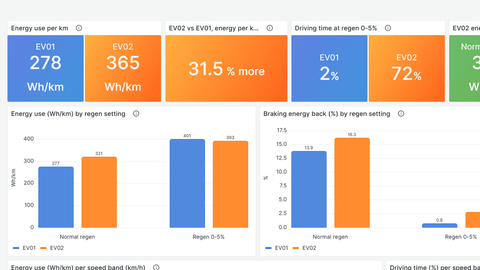
The agent finds every drive via Athena and computes the energy per km from the battery power.
The result: One of the two EVs needs ~30% more energy per km. Not because of speed, but because its regen is set to just 5% in most drives - so the braking energy is lost.
The agent turns your question into SQL (text-to-SQL) that runs in Amazon Athena, Google BigQuery or Azure Synapse - and only the results come back to your PC. If you had instead downloaded the data, it would have added massive egress fees and transfer time (see our CAN telematics at scale article).
The SQL route scales to 100s of devices and years of data - and the skill asks before costly queries.
Note that the agent also reads the DBC files and project notes first, e.g. to pick the right battery power signal.
7: Grafana dashboards + alerts
Once I know what to look for, I want to keep an eye on it - without asking the agent every day.
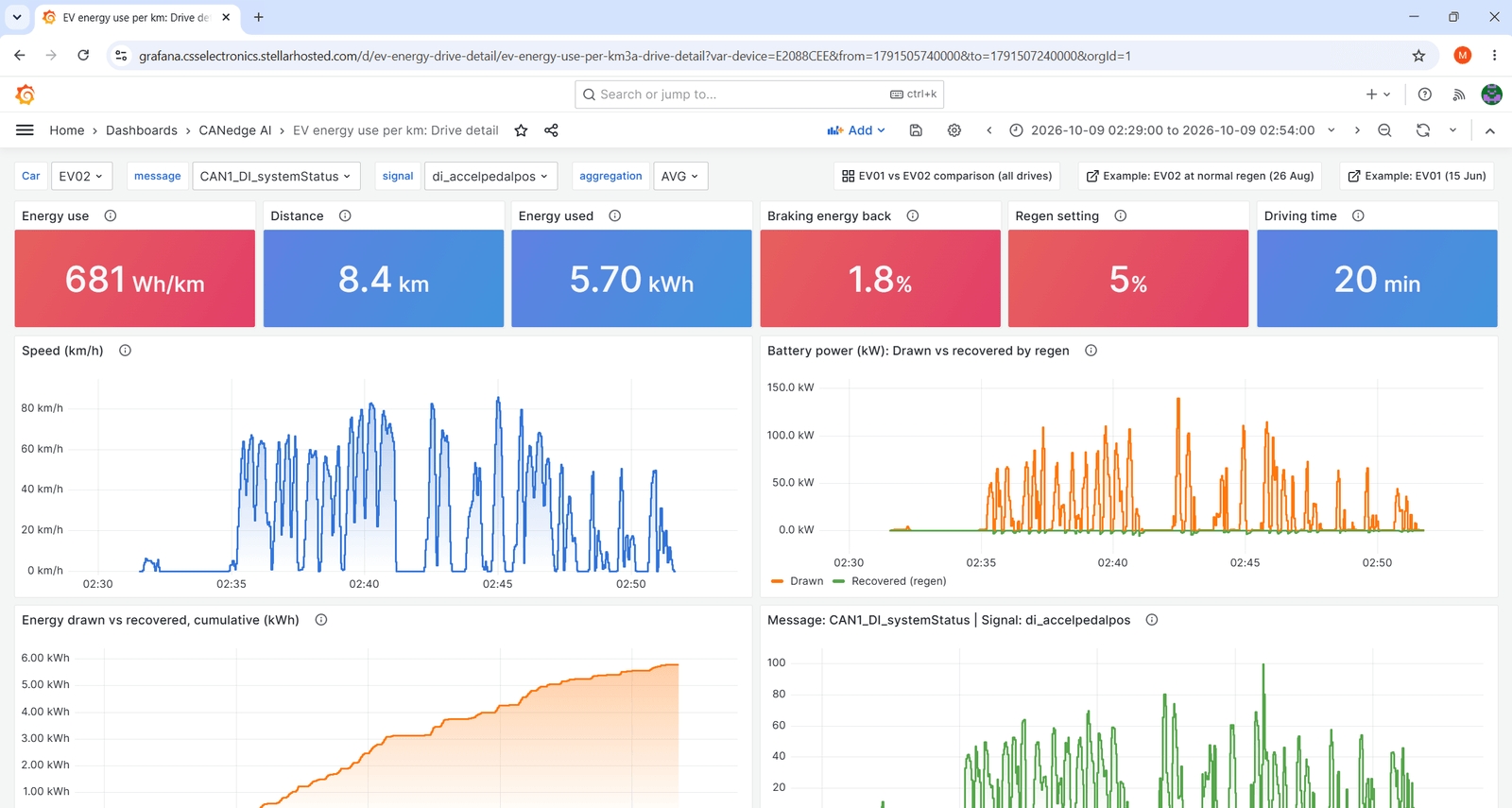
Turn this analysis into a Grafana dashboard
Alert me when a charging fault occurs on any vehicle
Via the skill, the agent has access as 'editor' in my Grafana account, writes the dashboard JSON and imports it into Grafana.
Afterwards, it adds an event to my data lake automation, so I get an email when the fault occurs.
The skill builds dashboards from our official Grafana-Athena dashboard templates - and checks every panel against the actual tables and signals in your data lake before you import it. This means you don't have to get every table or signal name 100% right - the agent will handle that.
You can also check out our previous Grafana Assistant article. Today, however, I personally prefer to use the CANedge AI skills as it allows me to customize everything to my preferences and update the skill accordingly.

Part 3: Remove the bottleneck - democratize your data
One problem remains: My colleagues keep asking me for data! So I let them ask the data lake directly - via their own agents.

8: Let the team talk to the data
I give my colleagues the skills with query-only keys. Now e.g. a service technician can ask their own questions:
Which vehicles had a charging fault in August?
Is the usable capacity of any battery pack below nameplate?
They get answers as shareable pages - without knowing SQL, DBC files or the data lake structure. And I get my time back.
This goes beyond queries: With the same skills, any colleague can now configure a CANedge, optimize filters, fix DBC files or analyze log files locally (showcases 1-4).
Anyone on my team is now a CANedge super user!
Query-only keys and Grafana dashboards already give non-experts safe access. What's new is the combination: The agent already writes good SQL - and the skills add the CANedge part. They know how the data lake is structured, which DBC applies to which device and which signals to trust - and how to query it the right way (e.g. without downloads).
The Athena keys (as used by Grafana) can only run queries: No access to your S3 bucket or data lake settings.
Part 4: Power user mode
The showcases so far assumed no expertise in AI agents, the CANedge or CAN. But if you know exactly what you want, you can ask for so much more - and let the agent run analyses that would normally take weeks.
9: Build an AI battery fingerprint
Now I put on my battery engineer hat: I want a model of every battery pack in the fleet. So I write a detailed prompt:
Build an electrical fingerprint of every battery pack in our fleet from the data lake:
- Fit an equivalent circuit model per pack: OCV vs SOC and the pulse resistance from 0.1 s to 5 min
- Map the internal resistance over SOC and temperature, with bootstrap confidence intervals
- Validate the model on drives it has not seen
- Check how close each pack gets to its voltage limit at peak current
Use one sub-agent per vehicle for data QA and an independent sub-agent to challenge the method. Give me one
report with all plots and rotatable 3D views
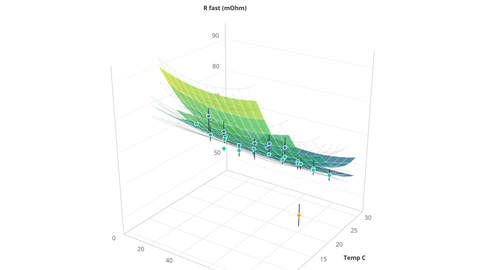
The agent fits a model to every drive of all 3 vehicles - and returns one interactive report with rotatable 3D plots.
The result: One vehicle hits its current limit at low SoC, and another's pack has ~20% lower resistance. On unseen drives, the model predicts the pack voltage to within ~0.2%.
Again, reflect on this: By combining your domain expertise with the CANedge AI skills, you'll be able to extract insights that would otherwise be completely out-of-reach.
You don't have to be a CANedge super user or an AI expert. But you know your own application inside out - e.g. battery physics, how your vehicles are used and which faults matter.
That knowledge is what turns a vague question into a prompt like the one above. Combined with the skills, the result is not just a 10x speed-up of your existing work - but analyses you would never have had the time to do at all.
The agent ran 4 sub-agents in parallel: One per vehicle to check the data - and an independent reviewer that only saw the method and its outputs, with the task to break them.
In this case it worked: The reviewer found that 2 model parameters were artifacts of the method. And a vehicle sub-agent found a better source of resting voltages (the BMS wakes the bus every ~2 h). The agent rebuilt the model - so the result is better because the agents disagreed.
The heavy number crunching for the model runs as SQL inside the data lake (e.g. Athena). Only the small summary results come back to my PC - not the raw data. This way, the same analysis works for 100s of vehicles and years of data.
None of the CANedge AI skills fit battery models - so the agent wrote ~1500 lines of code. The skills supplied data lake access, cost guards, DBC context and report format.
In other words, the skills don't limit the agent to pre-built workflows, they just abstract away a ton of heavy lifting so agents can freestyle on the parts that need to be dynamic.


10: Create custom tools in minutes
The skills also make the agent a strong tool builder: It knows how the CANedge works - from the Configuration File and S3 to the Parquet data lake. So it can build fully working tools for your exact needs, e.g. for configuration, S3 access or data analysis.
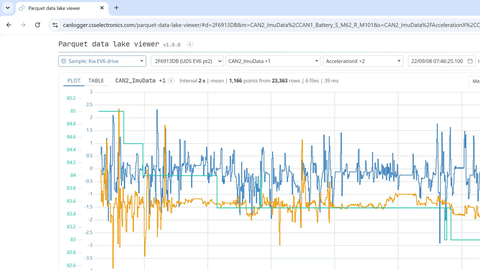
As an example, I want a simple way to plot Parquet files from a local data lake - without installing software:
Build a Parquet data lake viewer as one self-contained HTML file (DuckDB-WASM and the decoded sample-data
embedded) that we can host on our website - and that also works offline:
- Load a data lake folder, a zip or Parquet files and query them locally with DuckDB
- Plot tab: Pick a device, one or more messages and up to 10 signals, with shared, per-signal or stacked Y
axes. Resample in SQL to the zoom level, like Grafana
- Table tab: Inspect a file's columns, types and rows
- Open on the sample data, so visitors can try it right away
- Make it robust to large lakes, corrupt files and the browser's memory limits
Keep the UI compact with the controls in one row, and style it like the CANedge skill reports. Test it on the
sample data and our large local data lake
From a few minutes of prompting, the agent builds a Parquet data lake viewer - which we now host as a free online tool.
Key takeaways
Overall, I believe AI agents are the future of how we work with CAN data:
- The right tools + context let an AI agent take over the heavy lifting of CAN analysis
- Open standards make the CANedge uniquely suited for AI agents - with no lock-in
- The CANedge AI skills suite takes you from SD card data to fleet-wide diagnostics
- Skills turn expert knowledge into workflows that anyone in your organization can use
- Power users can go much further - e.g. sub-agents, statistics and 3D plots
- This is just the beginning: We'll keep improving the skills - incl. via your feedback
I hope you found this useful - if so, please share it in your community!
Contact me if you have questions - or if you want 100% free support to set this up.

Ready to analyze your CAN data with AI?
Get your CANedge today!


