


 WIFI + LTE
4G LTE + WiFi access point. Stream CAN data locally or remotely
 VPN-READY
WireGuard client: Secure remote access to your devices
 MULTI-DEVICE
2 x Ethernet + 50 WiFi clients. Share one SIM across your devices
 VEHICLE POWER
9-30 V DC. Includes 12/24 V automotive power supply for vehicles
 INDUSTRIAL
Aluminium housing. -40 to +75 degC. 8 x 3 x 7 CM. 125 G. DIN rail
 UNLOCKED
Your own mini SIM and data plan. EU/APAC or North America variant
About the RUT200 WiFi/LTE router
The RUT200 from Teltonika is a compact industrial 4G LTE router with a WiFi access point and 2 x Ethernet ports. It runs the Linux-based RutOS with built-in VPN support (e.g. for WireGuard).
We offer the router as an accessory for our CAN bus hardware: Connect the CANsub via Ethernet to stream CAN data wirelessly via WiFi - or from anywhere via LTE and VPN in real-time. Or, use the router as a WiFi access point for the CANedge2. You can even deploy both in hybrid setups.
Learn more in our CANsub + Ethernet video here - or below:
- Article: CAN streaming via USB, LAN, WiFi and LTE
- CANsub Intro: Remote access via LTE and VPN
- Article: CANedge2 web server interface
CANsub / CANedge2 WiFi access
Connect the CANsub to the router and join the router's WiFi from your laptop, tablet or phone. You can now stream live CAN data via e.g. webCAN in your browser. No SIM required.
This is useful e.g. for technicians who need to troubleshoot vehicles or machines in the field without obstructing the operator - or when the CANsub is deployed in hard-to-reach locations. As always, mTLS can be used to restrict access.
In our CANsub WiFi showcase, we stream UDS data from an electric car via WiFi - at 50+ m distance.
Alternatively, you can use this setup to access a CANedge2 via the web server interface to pull log files when in WiFi range.
CANsub / CANedge2 LTE access
Insert a SIM card and set up the router as a VPN client via our CANsub Intro guide. You can then stream live data from the CANsub via webCAN or python-can from anywhere - e.g. from prototype vehicles or remote machines.
The CANedge2 can use the router's WiFi to upload log files to your own S3 server via LTE. Or, use the web server interface to browse the SD card via VPN and pull only the files you need.
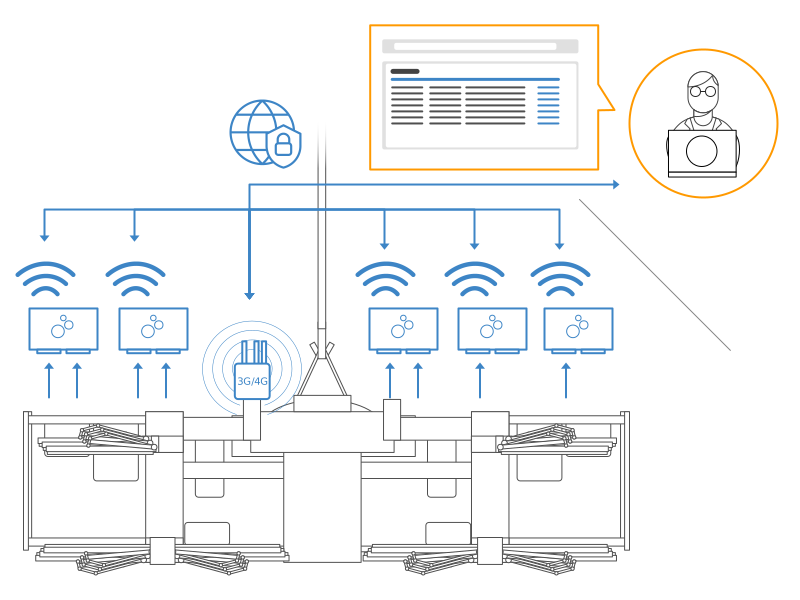
Finally, you can deploy both on the same LTE connection: The CANsub streams CAN data in real-time, while the CANedge2 records all data to an SD card as a blackbox. This combines 100% reliable logging with ad hoc real-time access.
In our CANsub LTE showcase, we use this setup to stream UDS and GPS data from an electric car while driving.
The router is manufactured by a 3rd party (Teltonika Networks) and is broadly compatible with SIM cards from most data plan providers. However, we recommend that you test the router with your specific SIM and provider well in advance of a field deployment - and that you verify that the frequency bands of your provider match the router variant (see the tech specs).
We are happy to support questions related to using the router with the CANsub or CANedge2 - incl. via our step-by-step guides. For advanced router questions (e.g. RutOS features, carrier-specific settings), we may refer to the Teltonika wiki and support.
The RUT200 is available for Europe, Asia-Pacific and other regions - but not for North America. For USA and Canada, we therefore offer the RUT241 via the dropdown. The RUT241 is the same class of device: Same size, housing, power input, WiFi, Ethernet ports and RutOS features. The North America variant supports the relevant LTE bands (B2, B4, B5, B12, B13, B14, B66, B71) and is FCC/PTCRB certified for use with Verizon, AT&T and T-Mobile.
All information on this page applies equally to the RUT241 unless otherwise stated.
WiFi access: Connect the CANsub's Ethernet port to a LAN port of the router and power the CANsub via USB (or via the PoE adapter). Join the router's WiFi from your laptop, tablet or phone - then enter the device URL shown on the CANsub LCD in your browser to open webCAN. No SIM card is required for this setup.
Remote LTE access: Insert a SIM card and follow the CANsub Intro step-by-step guide. Here, plug & play scripts deploy a WireGuard VPN server on Amazon Lightsail (~5 USD/month) and configure the router as a VPN client - typically in ~30 min. Your PC connects to the same VPN, after which you can access the CANsub via webCAN or the REST/WebSocket API from anywhere. The setup scales to fleets of routers and multiple users. If you already have a VPN server (e.g. an office VPN), you can use that instead.
To connect 2 x CANsub via Ethernet, simply configure the router's WAN port as a LAN port in the RutOS WebUI.
Insert a SIM card in the router and add the router's WiFi SSID/password to the CANedge2 configuration - as with any WiFi access point (see the CANedge2 Intro). With the S3 interface enabled, the CANedge2 will upload log files to your own S3 server via the LTE connection - with TLS encryption enabled.
Alternatively, enable the web server interface to access the CANedge2 SD card from any PC on the router's network - or remotely via the router's VPN. The web server interface does not support TLS, so remote access via the internet must go through a VPN.
Check out our tech specs, use cases or FAQ - or buy now!
Do you have any questions?
Contact usNote: Check the frequency bands used by your data plan provider vs. the variant below. If in doubt, contact us.
| GENERAL | |
|---|---|
| Manufacturer | Teltonika Networks (Lithuania) |
| In the box | Router, 9 W universal PSU, automotive PSU, 2 x LTE antennas, 1 x WiFi antenna, quick start guide |
| Configuration | Shipped with stock RutOS firmware - configure via the RutOS WebUI (initial login on device label) |
| Setup guides | CANsub Intro (remote access) and CANedge2 Intro (WiFi access point) |
| Safety | RUT200: CE/RED, CB. RUT241 (North America): FCC, IC, PTCRB, CE, UKCA and more |
| Support | We support CANsub/CANedge2 related setup. Advanced router questions may be referred to Teltonika |
| Compatibility | CANsub.2, CANsub.4 (via Ethernet). CANedge2, CANedge2 GNSS (via WiFi). Any other WiFi/LAN device |
| MOBILE | |
| Mobile module | 4G LTE Cat 4. Fallback to 3G and 2G |
| Bands (RUT200) | Europe/Asia-Pacific: LTE-FDD B1, B3, B5, B7, B8, B20, B28. LTE-TDD B38, B40, B41 |
| 3G: B1, B5, B8. 2G: B3, B8 | |
| Bands (RUT241) | North America: LTE-FDD B2, B4, B5, B12, B13, B14, B66, B71. 3G: B2, B4, B5 |
| Certified for Verizon, AT&T and T-Mobile (FCC, IC, PTCRB) | |
| SIM card | 1 x mini SIM (2FF) slot with external SIM holder. Unlocked - use your own data plan |
| Mobile antennas | 2 x SMA connectors. 2 x swivel LTE antennas (3 dBi) included |
| Mobile features | Auto APN, band lock, operator black/white list, SMS control, WAN failover, data quota control |
| WIFI & ETHERNET | |
| WiFi standard | IEEE 802.11b/g/n (2.4 GHz). Access Point (AP) and Station (STA) modes |
| WiFi clients | Up to 50 simultaneous connections (e.g. CANedge2 devices, laptops, tablets, phones) |
| WiFi security | WPA2-PSK, WPA2-Enterprise, WPA-PSK. SSID stealth mode and MAC address access control |
| WiFi antenna | 1 x RP-SMA connector. 1 x swivel WiFi antenna (5 dBi) included |
| Ethernet | 1 x LAN + 1 x WAN (RJ45), 10/100 Mbps. WAN port configurable as LAN (e.g. for 2 x CANsub) |
| Passive PoE | Router can be powered via LAN1 (9-30 V DC passive PoE). Not compatible with IEEE 802.3af/at |
| VPN & SECURITY | |
| VPN | WireGuard (client/server), OpenVPN (client/server), IPsec (IKEv1/IKEv2), GRE, PPTP, L2TP |
| Stunnel, SSTP, ZeroTier. Used e.g. as WireGuard client in the CANsub Intro remote access guide | |
| Firewall | NAT, port forwarding, traffic rules, DMZ. DDoS and port scan prevention. VLAN separation |
| Management | HTTPS WebUI, SSH, JSON-RPC API, SNMP, MQTT. Optional Teltonika RMS (remote management) |
| Firmware | RutOS (OpenWrt based Linux). Update via WebUI, from server (FOTA) or RMS |
| CANsub security | CANsub traffic is TLS encrypted end-to-end regardless of the router. Optional mTLS access control |
| POWER | |
| Power connector | 4-pin industrial DC power socket (3 mm pitch) |
| Input voltage | 9-30 V DC. Reverse polarity protection. Surge protection >33 V DC (10 µs max) |
| Power consumption | <6.5 W max. Typically 1-4 W depending on LTE/WiFi load (e.g. ~1.3 W with 4G + 1 device) |
| Included PSU | Universal 9 W PSU: 100-240 V AC input, 9 V DC / 1 A output, 4-pin plug |
| Exchangeable plugs for EU (Type C), US (Type A), UK (Type G) and AU (Type I) included | |
| Automotive PSU | Included: 12/24 V vehicle receptacle (cigarette lighter) to 4-pin plug. 9-30 V DC, 2 A, fused |
| Cable length 2 m. LED indicator. Ideal for cars, trucks, tractors and other vehicles | |
| Digital I/O | 1 x digital input, 1 x digital output (open collector) on the 4-pin power connector |
| MECHANICAL | |
| Housing | Aluminium housing with plastic panels |
| Dimensions | 83 x 25 x 74 mm (W x H x D) excl. antenna connectors and antennas |
| Weight | 125 g (router only) |
| Mounting | Bottom and sideways DIN rail mounting slots. Optional DIN rail and surface mounting kits |
| Temperature | Operating temperature: -40 degC to +75 degC |
| Humidity | 10% to 90% non-condensing |
| Ingress protection | IP30 (indoor/in-cabin use) |
| Status LEDs | 3 x connection type, 5 x signal strength, 2 x LAN status, 1 x power |
Below we outline example use cases for the RUT200 as an accessory for the CANsub and CANedge2 - with links to details:

Wireless CAN streaming in the field
Need to troubleshoot a vehicle wirelessly - without a cable to your laptop?
Install the CANsub in the vehicle (e.g. via an OBD2 adapter) and connect its Ethernet port to the RUT200. Field technicians can now join the router's WiFi from a laptop, tablet or phone and open webCAN to stream, DBC decode and plot live data - or run diagnostic request sequences with on-device timing precision. In our WiFi showcase, we stream data from an electric car at 50+ m distance. Enable mTLS to ensure that only authorized technicians can connect.
Remote CAN access via LTE and VPN
Need to stream CAN data from a vehicle or asset on the other side of the world?
Insert a SIM in the RUT200 and configure it as a VPN client using the plug & play scripts in the CANsub Intro. The CANsub can then be reached via webCAN or the REST/WebSocket API from anywhere - e.g. in prototype vehicles, wind turbines or customer machines. Edge-based timestamps and transmit sequences keep the data precise despite LTE latency, while hardware filters keep the data volume (and SIM cost) low. See our LTE showcase and our secure CAN interface article.


Field data pull via WiFi
Need to pull select log files from a machine - without extracting the SD card?
The CANedge2 is often installed as a blackbox in hard-to-access locations, e.g. electrical cabinets in mining trucks or generators. Mount the RUT200 on the asset and connect the CANedge2 to its WiFi with the web server interface enabled. On site, a field technician simply joins the router's WiFi and browses the SD card via the browser - downloading only the log files of interest while the device keeps logging. A simple Python script via the REST API can automate e.g. pulling a specific time period.
Blackbox with selective remote data pull
Need to pull select log files from a remote CANedge2 - not all of them?
Often you do not want to upload all data - e.g. for a blackbox on a machine where you only need data when an incident occurs. Configure the CANedge2 with cyclic logging and the web server interface, and connect it to the RUT200 WiFi. Via the router's VPN, you can browse the SD card from your office and download only the log files of interest - minimizing LTE costs while avoiding site visits. See our Ematec case study.

Blackbox logging + real-time streaming
Need both reliable CAN logging and live streaming from the same asset?
Some assets require both: Reliable logging of all CAN data and ad hoc real-time access. Connect a CANsub and a CANedge2 to the same RUT200 - via Ethernet and WiFi, respectively. The CANedge2 acts as a blackbox with historical data reachable via the VPN, while the CANsub lets you stream live data via webCAN, python-can or custom apps. In our LTE showcase, a CANedge2 incl. GNSS even adds GPS data to the CAN bus for the CANsub to stream.
No. The router ships with the stock Teltonika RutOS firmware and is configured via its WebUI (login details are printed on the device label). For WiFi access to a CANsub, no configuration is needed beyond joining the router's WiFi. For remote access via LTE, the CANsub Intro provides plug & play scripts that deploy a VPN server and configure the router as a VPN client. For the CANedge2, simply add the router's WiFi SSID/password to the device configuration.
The RUT200 does not support North American frequency bands. Instead, select the RUT241 (North America) variant via the dropdown. It is functionally equivalent (same housing, power, WiFi, Ethernet and RutOS) and is certified for Verizon, AT&T and T-Mobile. For other regions, check the tech specs to verify that the bands of your data plan provider are covered - or contact us.
The router takes a standard mini SIM (2FF) - i.e. the largest of the common SIM formats (most SIMs come in a multi-size frame). Any data SIM from a mobile provider can be used, as the router is unlocked. We recommend that you test your SIM/provider in the router well before deploying in the field. If your SIM has a PIN code, either disable it or enter it in the RutOS WebUI so that the router can connect after a power cycle. APN settings are typically detected automatically, but can be set manually.
The router accepts 9-30 V DC, making it suitable for both 12 V and 24 V vehicles. The simplest option is the included automotive power supply, which plugs into the vehicle's 12/24 V receptacle (cigarette lighter). For permanent installations, the 4-pin connector can be wired directly to the vehicle supply - e.g. via an ignition-switched circuit so the router powers down with the vehicle. The CANsub itself is powered via USB (e.g. from a USB car charger) or via the PoE adapter from a PoE switch - note that the router's own passive PoE is not compatible with the PoE adapter.
Yes. The router has 1 x LAN and 1 x WAN port. When using LTE (or WiFi) as the internet source, the WAN port is not needed and can be configured as a second LAN port in the RutOS WebUI - letting you connect 2 x CANsub via Ethernet. For more devices, add a small Ethernet switch (optionally with PoE to power the CANsubs).
The amount of data used during streaming via the CANsub will depend entirely on your CAN bus load, your CANsub hardware filters and other similar factors. It may be anywhere from a few MB per hour to 1+ GB per hour. The same principle applies to the CANedge2 when it uses the RUT as a WiFi access point for uploading data to S3. Here you can again configure device filters to minimize the data getting sent over the LTE connection. For detailed guidance based on your use case, contact us.
If your goal is to upload CAN data via LTE to your server, the CANedge3 is the simpler choice, as the LTE modem is built into the logger. The router is relevant if you need the CANedge2 web server interface (selective data pull via VPN), if you want to share one LTE connection across multiple devices - or if you combine the CANedge2 with a CANsub for real-time streaming.
The CANsub encrypts all communication via TLS out-of-the-box, and you can optionally enable mTLS so that only clients with a valid certificate can connect - see our secure CAN interface article. The CANedge2 S3 interface also uses TLS. The CANedge2 web server interface does not support TLS, so remote access to it should always go through the router's VPN (never via port forwarding). The router's firewall blocks incoming connections from the internet by default. We recommend VPN + mTLS for all remote deployments - and listen-only mode where possible.
Still have questions?
Contact us