Grafana Dashboards for CANedge: 5 Big Upgrades [News]
news / 2025-09
Our Grafana dashboard integration for the CANedge CAN bus data logger gets 5 big upgrades: Amazon, Google + Azure parity, easy event detection, J1939 DM1 + geofences, historical backlog processing and fleet telematics trip summaries. Plus: Our free J1939 webinar.
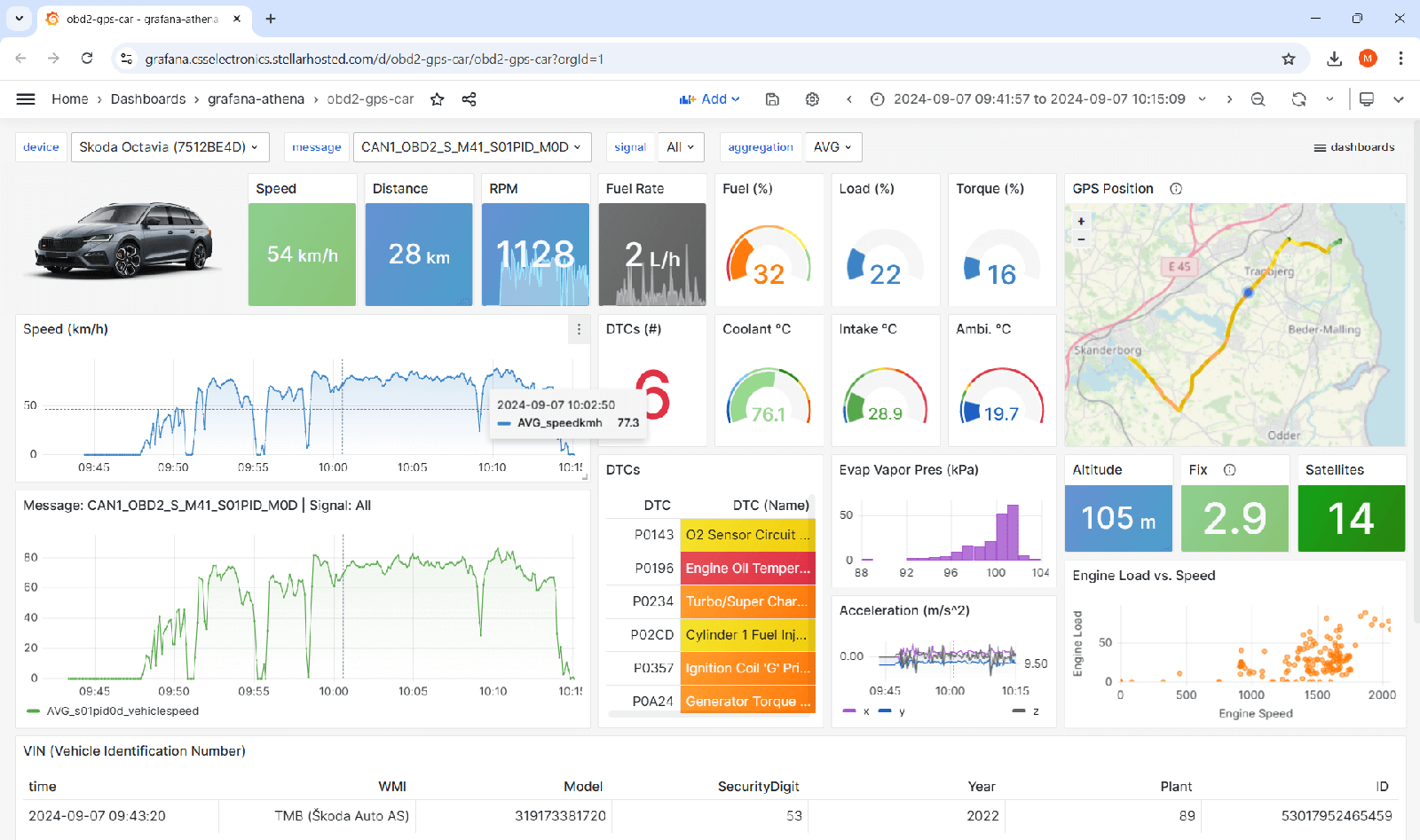
5 big upgrades to our Grafana dashboard integrations
The CANedge2/CANedge3 lets you log CAN/LIN data to an SD card - and auto-push it to your own server via WiFi/LTE, respectively.
You can use various free software/API tools to analyze your data - and one of the most popular tools is Grafana dashboards.
We provide plug & play 'automation workflows' that enable the integration with Grafana. Specifically, the workflows automatically DBC decode uploaded log files - creating a data lake that is ready for visualization/analysis. This can be used across any CAN protocol (J1939, OBD2, UDS, XCP, NMEA 2000, CANopen, ...) and any use case.
Below we cover our latest 'v4 update' to this integration - with 5 major improvements:
- Streamlining Amazon, Google & Azure
- CAN signal event detection made easy
- J1939 DM1 + geofences via 'custom signals'
- Historical backlog processing in the cloud
- Fleet analysis/visualization via trip summary data
1: Streamlining Amazon, Google & Azure
The most popular servers used by our CANedge end users are Amazon, Google and Azure - together covering 90%+ of use cases (the rest being primarily self-hosted).
We refer to our dashboard integrations as 'Grafana-Athena' (Amazon), 'Grafana-BigQuery' (Google) and 'Grafana-Synapse' (Azure).
We provide Grafana integrations for all three clouds - but historically we focused on Amazon. As a result, Google/Azure deployment was complex and lacked key features.
With our v4 update, all three cloud integrations are 100% streamlined. This means that all integration features are now available across both Amazon, Google and Azure.
In addition, a key advantage of Amazon has been the ability to auto-deploy the integration so that 'anyone can do it' in just a few clicks. We now also support this for Google/Azure (via Terraform) - reducing deployment complexity/time by 95%!
Finally, we also provide all our plug & play dashboard templates across all clouds.
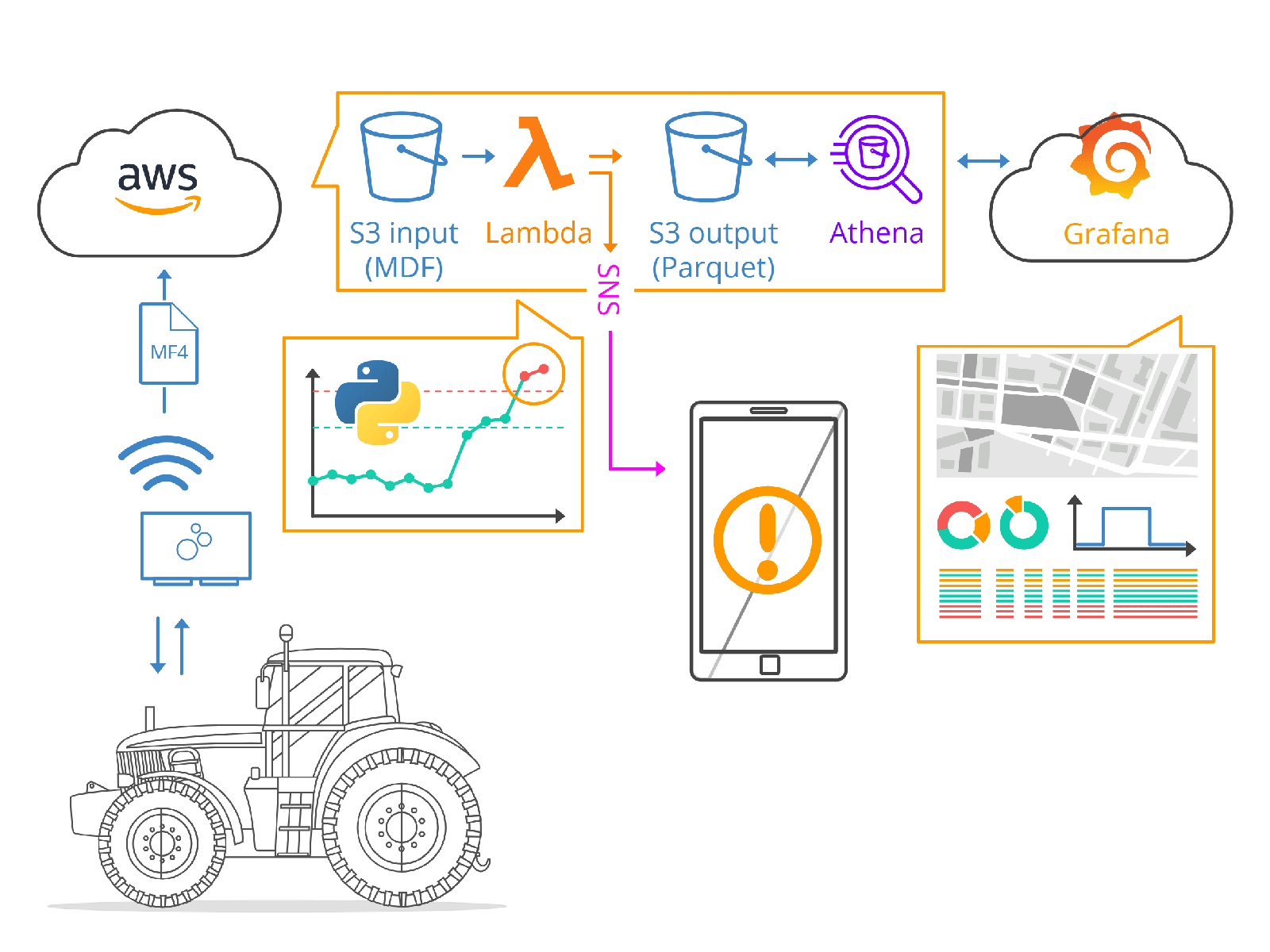
2: CAN signal event detection made easy
With the new v4 update, 'event detection' just got a lot easier!
All you have to do now is add an events.json file to your input bucket, in which you specify the CAN signal events you wish to detect - no custom coding is required.
As a result, you can now deploy event detection in seconds!
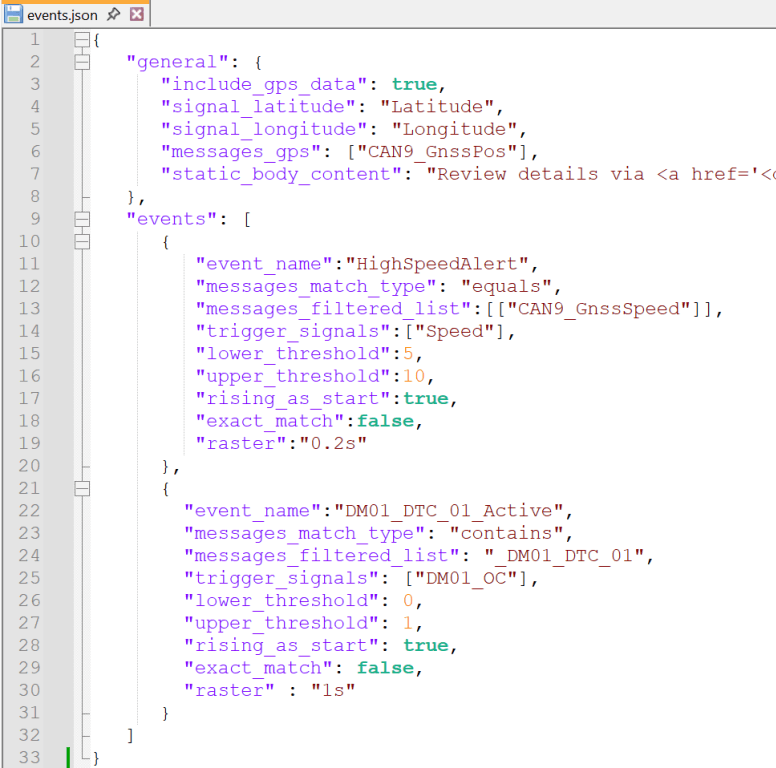
Via the events.json file you fully control what you wish to detect - for example:
- Temperatures exceeding thresholds
- Speeding, harsh braking, ..
- J1939 DM1 DTCs becoming active
- Geofence events
- State changes
- ..
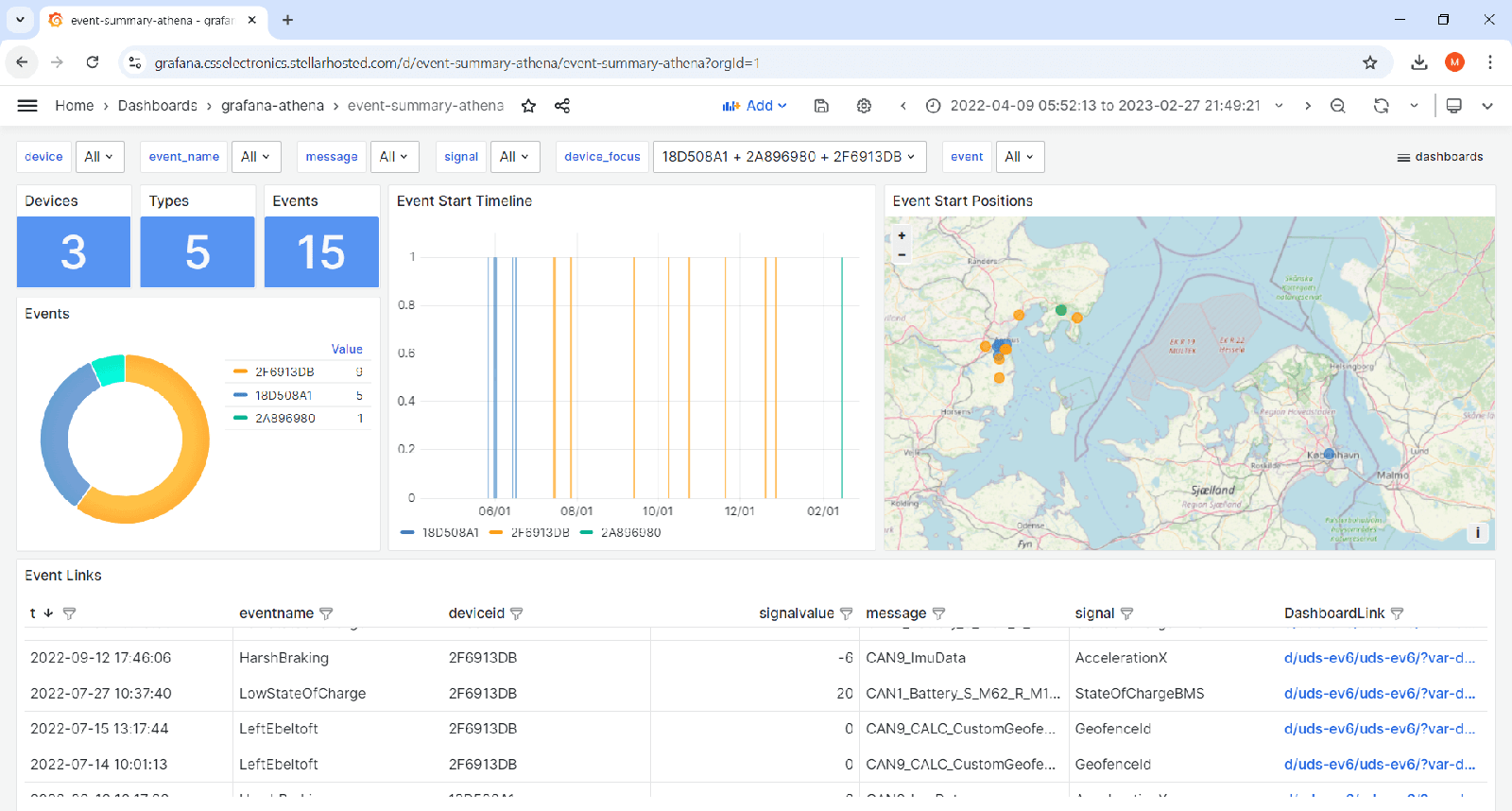
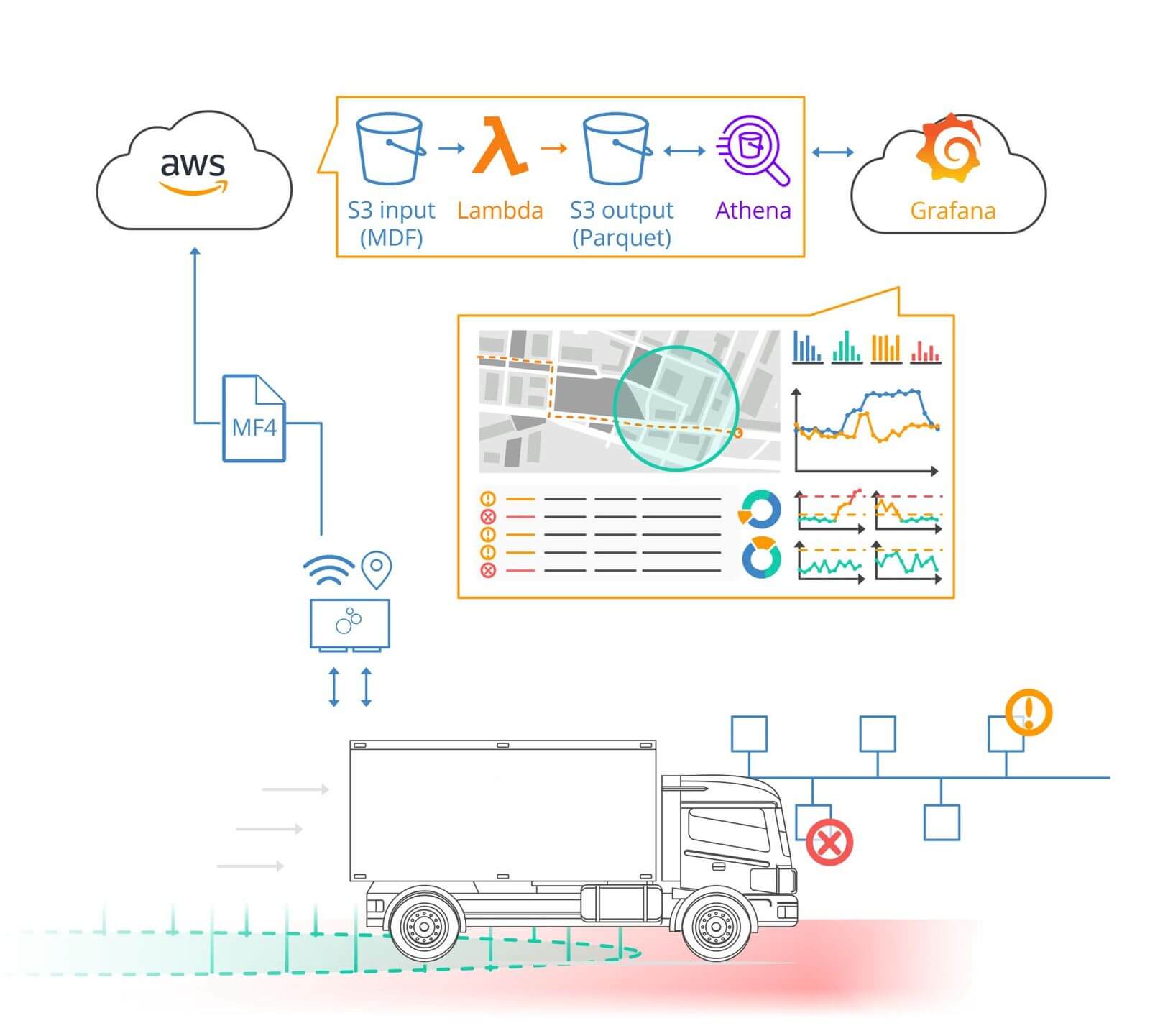
Once setup, the cloud function checks every uploaded log file for events. If detected, meta info is added to your data lake - and a notification is sent to subscribers via email/SMS.
This also lets you visualize historical events via our plug & play event summary dashboards - and quickly go from the high level event overviews to your full resolution device dashboard, showing +/- 20 min around your event. See this in action via our Grafana event summary dashboard playground!
Event detection is extremely powerful for OEMs/operators that wish to offer predictive/proactive maintenance - or engineers troubleshooting intermittent issues.
Learn more in below article (or in the docs) - and add your custom events today!
3: Easy J1939 DM1 + geofences via 'custom signals'
Want to easily visualize J1939 DM1 DTCs - or add your own custom geofences?
Many CAN telematics use cases require custom messages/signals, beyond what can be handled in e.g. Grafana. In such cases you can create new Parquet data lake tables with your calculated signals - and now this is much easier to implement!
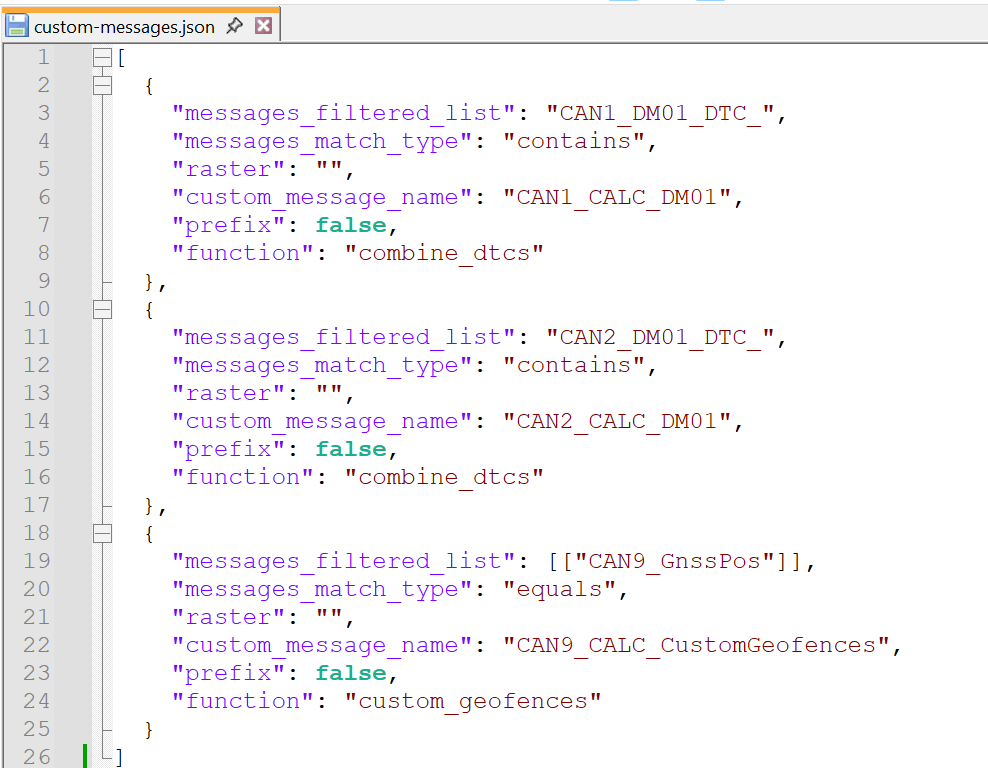
In our new update you add a custom-messages.json file to your S3 input bucket. In this file you specify what custom messages to add to your data lake, referencing either 'built-in' or custom Python functions that your cloud function will apply.
In particular, you can leverage below built-in functions (no coding required):
1: Combine J1939 DM1 messages
Add a combined DM1 (Diagnostic Message 1) table across source addresses and DTCs - enabling easy visualization in Grafana. See the result in the lower-right panel of our J1939-73 Grafana dashboard playground.
2: Add custom geofences
Add a table that stores the geofence status of your device - and monitor when your CANedge enters/exits your specified geofences. The geofence message can of course be used as an input for your event detection!
3: Combine & resample messages
In some cases you may want to combine signals across many different tables - but avoid querying each table separately. In such a case, you can use the custom function 'resample' to create a joint resampled table for fast, light-weight queries.
4: Process your historical MF4 backlog into your data lake in seconds!
When you deploy our automation workflows, all new log files uploaded by your CANedge devices will get automatically DBC decoded and added to your data lake.
But: What about your historical log files?
Previously, adding historical data to your data lake was cumbersome. You had to use complex batch scripts, manually provide S3 details and go through a lot of steps. Further, data had to be pulled to your local PC - resulting in egress fees.
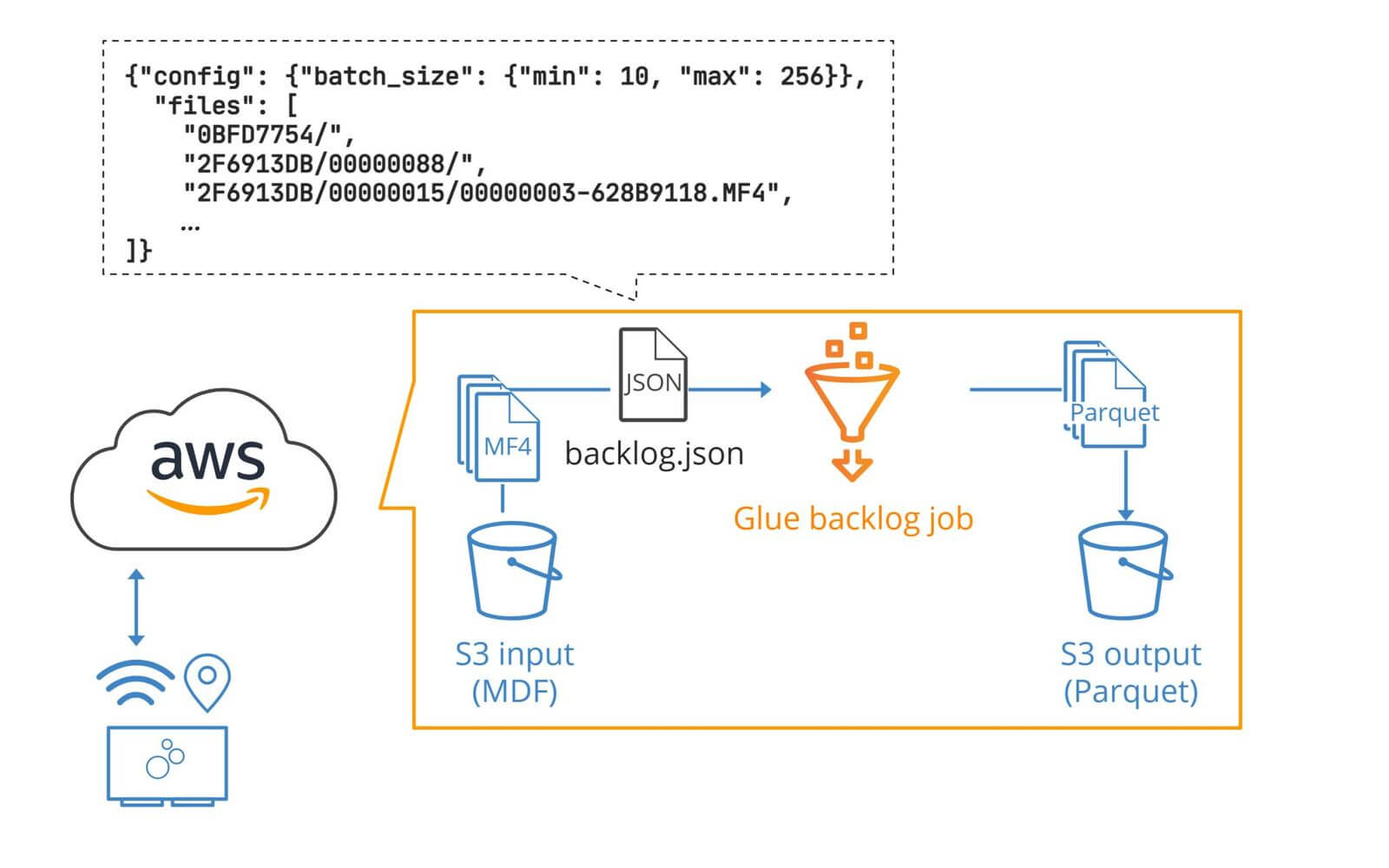
With our v4 update, you now simply upload a backlog.json file to your input bucket. In this file you specify which devices/sessions/files to process. Next, you simply click 'run' on a pre-deployed backlog job in your Amazon/Google/Azure cloud. That's it!
This has multiple benefits:
- Extremely easy to use - no local setup required
- Easily control what log files to process via a simple JSON
- Processing is faster and avoids egress fees
- Batches files to compact the data lake (improving query speed/costs)
- If your input bucket includes event detection or custom signals JSON files, these are applied to the backlog
5: Analyze/visualize your entire fleet with trip summaries
With the default Grafana integration you can easily visualize data from a single CANedge via 'device dashboards'. This lets you go from looking at weeks of data to troubleshooting an intermittent event with millisecond precision. Further, you can switch between devices via simple dropdowns.
But what if you wish to look at trip data across multiple devices?
For example, you may want to get a list of all trips across a fleet of 50 CANedge devices - and filter them based on signal data and meta information (VIN, ECU FW etc).
Here, the default data lake structure is not ideal as it splits data by device/message - meaning you'd e.g. need to run 50 queries to show average speed across 50 devices.
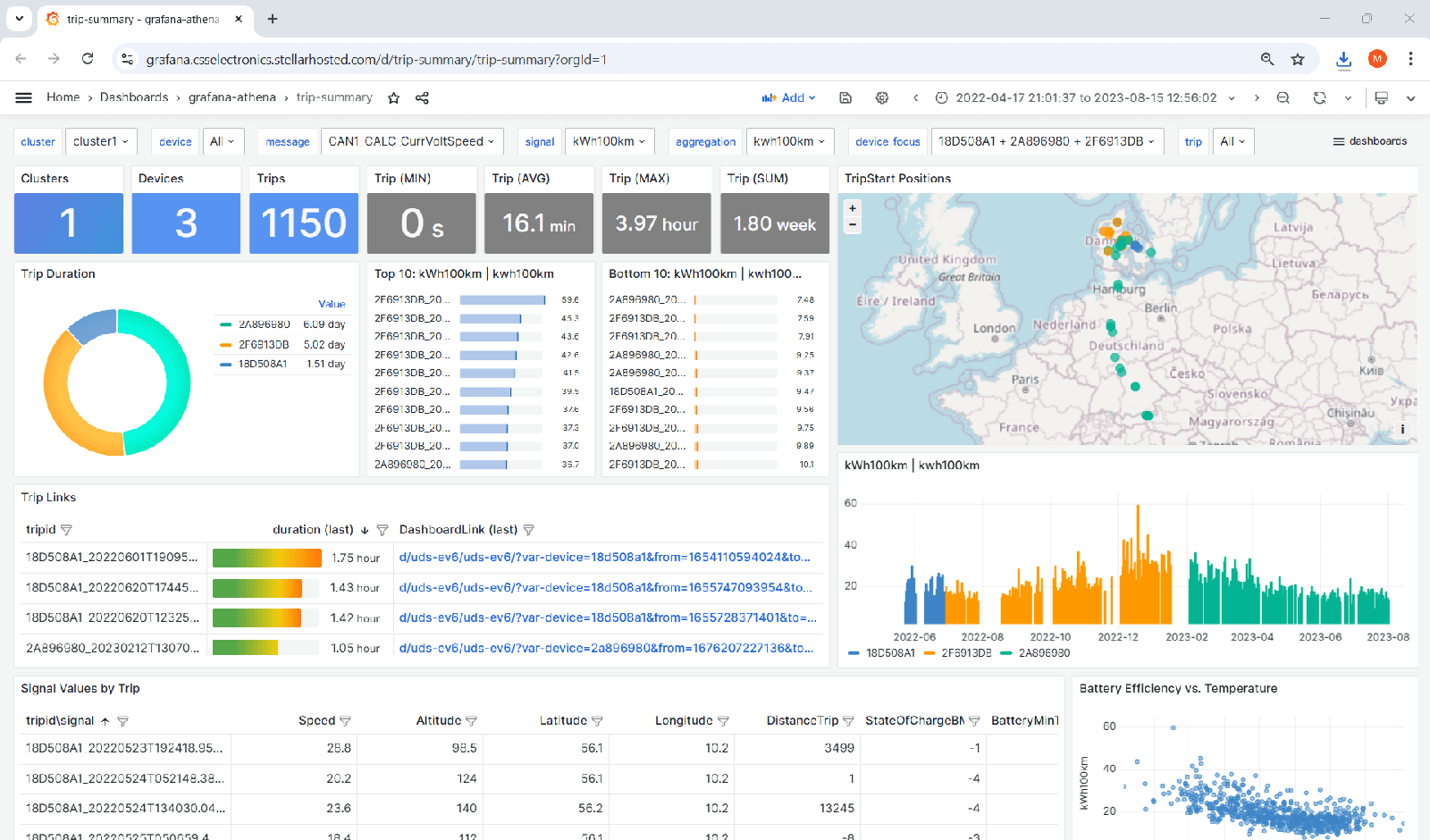
Luckily, this can be easily solved by extending your data lake with 'trip summary data'. Here, a new trip summary table is added, meaning you can extract data across hundreds of devices in 1 query. With our v4 update, this is now 100% plug & play.
All you have to do is upload an aggregations.json file to your input bucket. In this you specify what signals should be aggregated at trip level. For example, you may want to add avg speed, max altitude and min/max/avg oil temperature. Once you've uploaded your JSON, simply enable the daily aggregation script (which takes <5 sec).
The cloud job will now scrape your data lake on a daily basis, adding trip-level data to your data lake. We of course also provide a ready-to-use dashboard template for visualizing trips - check it out via our Grafana dashboard playground!
This is an extremely powerful tool - and now 10x easier to implement than before. Deploy it right now via the documentation below:
CSS comments on the v4 update
That was a mouthful, we know!
Our cloud automation workflows have become a core part of the toolbox for many CANedge users. The resulting Parquet data lakes serve as the basis for both Grafana dashboards and Python/MATLAB.
With the v4 update we make these integrations cloud agnostic - and drastically improve the ease-of-access for powerful features like event detection and trip summaries. We expect these will bring a ton of value to our users - and we're happy to help if you have any questions during deployment (just reply to this email).
![J1939 Intro, Data Logging & Telematics [Free Webinar | 2025]](https://www.csselectronics.com/cdn/shop/files/newsletter-2025-09-j1939-intro-data-logging-telematics-free-webinar-2025.png)
J1939 Intro, Data Logging & Telematics [Free Webinar | 2025]
Want a 100% free 1-hour masterclass on J1939?
In this webinar, Martin Falch (co-owner at CSS Electronics) covers the following:
- Intro to J1939 incl. basics, PGNs/SPNs and DBC decoding
- Intro to J1939-73 incl. the Diagnostic Message 1 (DM1) and DTCs
- How to log J1939 data in practice (connect, log, decode)
- J1939 telematics, data processing and dashboard visualization
This will be highly practical: Martin has 10 years of experience in supporting thousands of engineers and is the author of our popular intros and articles.
We strongly recommend this webinar if you want to step change your J1939 expertise!
Join the webinar today - and share it with your network!
This update was sent as part of our newsletter on 2 September 2025. You can also download it as a PDF.
Want updates like this in your inbox? Join our newsletter - or see all news.